Estimated read time: 9 min
Warehouse barcode scanning helps connect physical warehouse work to trusted inventory records. It is the process of scanning barcodes on products, cartons, pallets, locations, or warehouse documents so receiving, putaway, picking, packing, returns, movement, and cycle counts can be verified as work happens.
This article is for growing businesses that already understand inventory visibility matters, but want to understand why inventory accuracy often depends on something very practical: the barcode on the box.
Your Inventory Count Is More Than a Number
Your inventory count may be one of the most important numbers in your business. That is why this Warehouse Barcode Scanning guide starts with a simple question: can your team trust the number when work is moving fast?
It can represent warehouse value, future revenue, sellable supply, customer promises, purchasing decisions, and operational confidence. When that number is right, your team can move faster. When that number is wrong, pressure spreads quickly.
A customer asks if an item is available. A marketplace order enters the workflow. A wholesale buyer wants to know whether a larger order can ship this week. Your team checks the system, but someone still has to ask the warehouse whether the inventory is really there.
That is the moment the dashboard stops feeling like an answer.
The problem is not always that your business lacks software. You may already have Shopify inventory, marketplace inventory, an order system, a warehouse dashboard, or a 3PL portal. The question is whether the physical work in the warehouse is being verified quickly and accurately enough to keep those systems trustworthy.
That is where warehouse barcode scanning matters.
The WMS series explained that visibility is not the same as control. A warehouse management system can show inventory, but the system is only as strong as the activity feeding it.
Warehouse barcode scanning is one of the most practical ways warehouse activity becomes trusted inventory information.
What Warehouse Barcode Scanning Actually Means
Warehouse barcode scanning is the use of barcodes and scanning devices to identify products, locations, cartons, pallets, orders, or warehouse tasks as work happens.
In plain language, a barcode gives the warehouse a scannable identity. The barcode may provide an identifier or encoded information, but the connected warehouse workflow gives that scan operational context.
That distinction matters. A barcode by itself does not automatically tell the system everything about item, location, task, and next action. The scanner captures the identifier. The WMS or connected workflow interprets the scan against the expected activity. The warehouse employee performs and verifies the physical work.
That scan may support a simple inventory update, or it may be part of a more complete warehouse workflow.
Depending on the operation, warehouse barcode scanning may support:
- Receiving inventory when it arrives.
- Matching products to purchase orders or inbound records.
- Confirming putaway into a warehouse location.
- Verifying the item being picked.
- Confirming the quantity picked.
- Supporting packing and shipment preparation.
- Moving inventory between locations.
- Checking returned inventory.
- Supporting cycle counts.
- Flagging exceptions when the scan does not match what the system expected.
The important point is not that a warehouse owns scanners.
The important point is whether scanning is built into the workflow in a way that helps the warehouse verify work, update inventory, and prevent mistakes before they move downstream.
Why the Barcode on the Box Matters
The barcode on the box may look small compared with dashboards, integrations, reports, and warehouse software. But it often plays an outsized role in inventory accuracy.
A barcode helps turn a physical item into something the system can recognize. Without that scannable identity, the warehouse may rely more heavily on manual entry, visual checking, handwritten notes, spreadsheet updates, memory, or after-the-fact correction.
Those methods can work at a smaller stage. A small team may know the products well. Inventory may sit in a limited number of places. Order volume may be manageable. Returns may be rare.
Growth changes the work.
More SKUs, more channels, more warehouse locations, more employees, more returns, and more customer questions make manual verification harder to trust. The warehouse can still move product, but the business may not know quickly enough which product was received, where it went, whether it was picked correctly, or whether a returned item is available again.
The barcode helps answer a practical question:
Did the warehouse verify the right item, in the right place, at the right step, at the right time?
That question is the beginning of stronger inventory control.
How Barcode Scanning Works in a Warehouse
A warehouse scanning workflow usually follows a simple pattern.
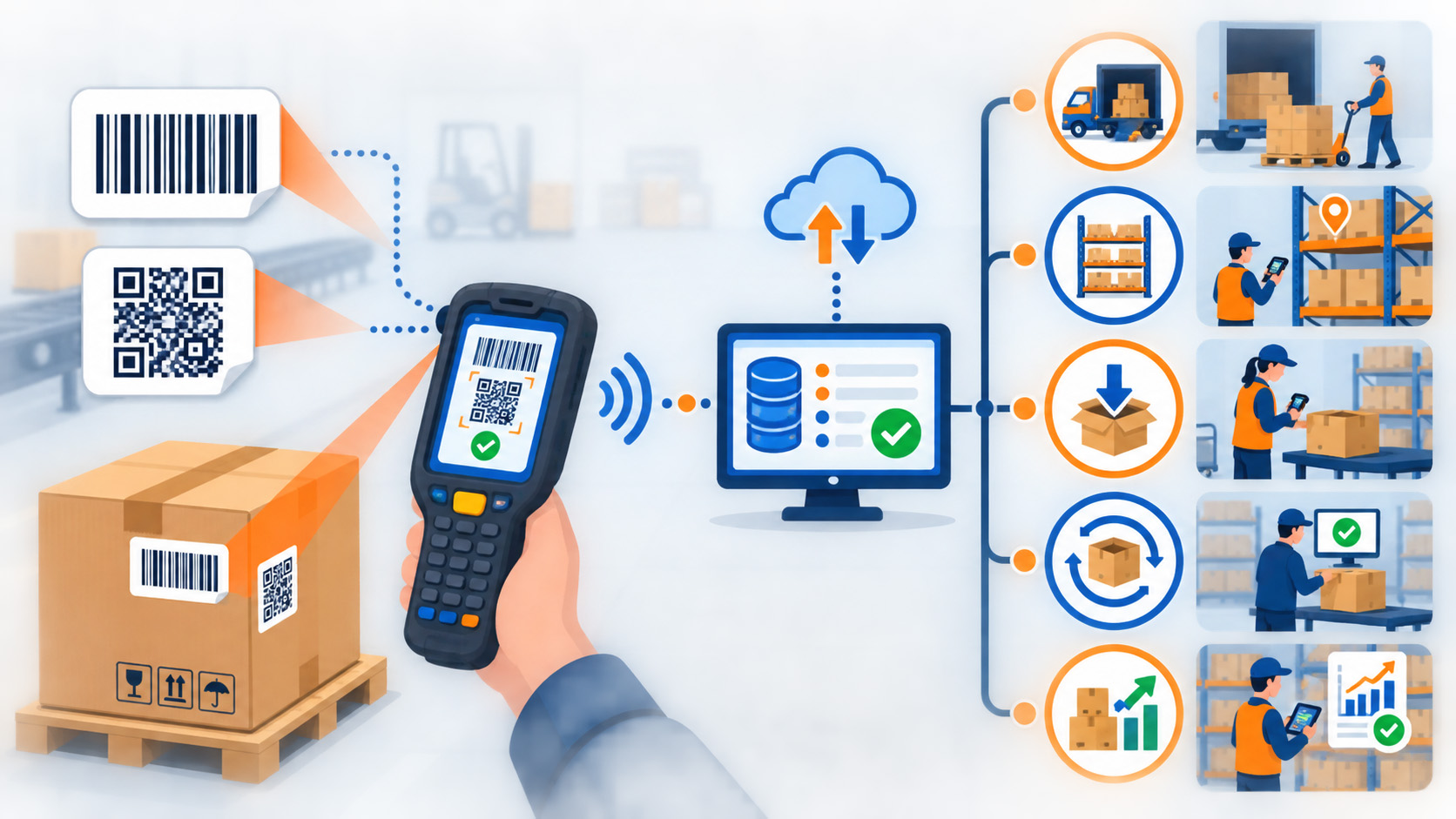
First, inventory, locations, cartons, pallets, or order documents are given barcode labels. The barcode may represent a SKU, carton ID, pallet ID, location, order, lot, serial number, return record, or another operational identifier.
Next, a warehouse worker uses a handheld scanner or PDA device to scan the barcode during the workflow. The scanner sends the scanned value to the connected system. The system then compares the scan against the expected task or record.
From there, the system can help answer questions such as:
- Is this the item expected for this order?
- Is this the correct warehouse location?
- Is this the quantity the system expected?
- Is this product already reserved?
- Is this return ready for inspection?
- Is this inventory blocked by an exception?
- Should the worker continue, stop, correct, or escalate?
This is where scanning becomes more than data capture.
It gives the warehouse worker immediate direction and confirmation. It also gives the business a better record of what happened on the floor.
That matters because inventory accuracy is not created only by counting stock. It is created by controlling the moments when inventory changes status, location, quantity, or availability.
1D Barcodes, 2D Barcodes, and Warehouse Labels
Most people recognize a traditional barcode as a set of vertical lines. That is often called a 1D barcode. It usually carries a simple identifier that the system can use to look up more information.
A 2D barcode, such as a QR-style or data-matrix-style code, can hold more information in a smaller space. It may support more complex data needs, depending on the label design, system configuration, and warehouse workflow.
That extra data can matter as warehouse systems become more connected. A 2D barcode may be used to carry or reference details such as a product identifier, carton ID, lot number, serial number, expiration date, purchase order, return authorization, or handling requirement. The scan can give the WMS more context at the moment of work, which helps the warehouse validate the item, apply the right workflow, reduce manual lookup, and support more precise inventory status updates.
That does not mean every warehouse operation needs the most advanced barcode format. The right label strategy depends on what the operation needs to identify and control.
For some inventory, a simple product barcode may be enough.
For other workflows, the warehouse may need more detail tied to:
- Carton identity.
- Pallet identity.
- Location.
- Lot or batch.
- Serial number.
- Return status.
- Handling requirements.
- Order or shipment preparation.
The future of warehouse scanning is not only about whether a barcode is 1D or 2D. The bigger question is whether the barcode strategy supports the way inventory actually moves.
A better barcode label is not useful if warehouse teams do not scan it at the right moments. A simpler barcode can still create strong control when it is connected to disciplined workflow.
That is the real lesson: a better barcode does not replace a controlled warehouse process. The barcode identifies or carries information. The scanner captures it. The workflow interprets it. The employee performs and verifies the physical activity. Management oversees priorities, exceptions, and process discipline.
What Handheld and PDA Scanning Help Warehouse Workers Do
Handheld scanners and PDA devices give warehouse workers a practical way to interact with the system while they are doing the work.
Instead of leaving the floor to check a desktop screen, waiting for someone to print a new instruction, or relying on memory, the worker can scan, receive direction, confirm completion, and move to the next step.
That is why warehouse scanning should be understood as worker enablement, not worker replacement. Technology provides structure. People provide judgment and execution.
That can help with:
- Receiving: Confirming what arrived and whether it matches expected inbound records.
- Putaway: Directing or confirming where inventory is placed.
- Picking: Verifying the correct SKU, quantity, order, and location.
- Packing: Confirming that picked inventory is prepared for the right shipment.
- Returns: Identifying returned items and supporting inspection or status decisions.
- Inventory movement: Recording when items move from one location or status to another.
- Cycle counts: Verifying inventory on a routine basis instead of waiting for large disruption-driven counts.
This gives the warehouse worker more than a scanner. It gives them a way to ask the system, "Is this correct?" before the mistake becomes a customer problem.
That is why scan-supported workflows can become so important during growth. They help reduce the number of moments where work depends only on memory, manual notes, or delayed correction.
In the EOS operating environment, scanning supports warehouse activity across connected EOS warehouse locations. Depending on customer and shipping requirements, scanning may occur at the individual-product or carton level. Location scanning also supports putaway and picking, while exceptions can be flagged for physical review by warehouse or inventory-control personnel.
Warehouse Barcode Scanning and WMS Visibility
A warehouse management system can only show what it knows.
That sounds obvious, but it is one of the most important ideas in inventory control. If a pallet was received but never confirmed, the system may not know it is ready. If an item was moved but not updated, the system may show the wrong location. If a return was physically placed in the building but not inspected or scanned into the correct status, the business may not know whether it can be resold.
The article Not All Warehouse Management Systems Are Created Equal explained that a dashboard may show what happened, while a stronger WMS helps control what happens next.
Barcode scanning helps create the event trail that makes that control possible.
A scan can help answer:
- What changed?
- Where did it happen?
- Who confirmed it?
- When did it happen?
- Did the scan match the expected workflow?
- Does the inventory status need to change?
- Is the order ready for the next warehouse step?
That does not mean scanning solves every warehouse problem by itself. A scan can be skipped. A label can be damaged. A workflow can be poorly designed. Product data can be wrong. People can still bypass required steps.
The value comes from connecting scanning, system design, warehouse discipline, and exception handling.
Your team does not need prettier data. Your team needs data it can trust when decisions have to be made.
Why Barcode Scanning Supports Better Customer Promises
Inventory accuracy does not stay inside the warehouse.
It affects customer service, marketplace performance, sales decisions, purchasing, returns, and leadership confidence. When your team trusts inventory, it can answer questions faster and make promises with less hesitation.
When your team does not trust inventory, the business slows down.
Customer service may wait for a warehouse reply. Sales may hesitate before committing to a wholesale order. Marketplace inventory may need manual adjustment. A returned item may sit unavailable because nobody knows whether it passed inspection. Fulfillment problems may reach the customer when warehouse activity is not verified clearly enough.
This is why barcode scanning is not only a warehouse-floor topic.
It helps protect the promise behind the sale.
If your business sells across ecommerce, marketplaces, wholesale, or retail-style channels, inventory accuracy becomes a customer-facing issue. The order may begin online, but the promise is fulfilled through warehouse execution.
The better the warehouse verifies activity, the stronger your inventory visibility becomes.
Why Warehouse Barcode Scanning Matters More as Operations Grow
Not every business needs a sophisticated scanning model on day one.
At a smaller stage, manual processes can be appropriate. A few SKUs, a small number of orders, one main sales channel, and a tight internal team may be manageable with simple tools and careful communication.
The earlier system was not necessarily a mistake.
The question is whether your business has outgrown what that system was designed to support.
Warehouse barcode scanning becomes more important when:
- SKU count increases.
- Inventory is stored in more locations.
- Order volume increases.
- More people touch the inventory.
- Returns become more common.
- Customer service needs faster answers.
- Marketplace inventory needs cleaner updates.
- Wholesale or B2B orders create larger quantity risk.
- Leadership needs better confidence before expanding channels or volume.
At that stage, the barcode on the box becomes less like a small label and more like an operating control point.
It is how the warehouse confirms that the physical work matches the system record.
How to Evaluate a Warehouse Barcode Scanning Claim
If a warehouse, software platform, or 3PL says it uses barcode scanning, do not stop at the scanner itself.
A better question is what the scanning workflow actually verifies during daily warehouse work.
Start with four practical questions:
- Which warehouse activities are scan-supported?
- Does scanning verify both the item and location?
- What happens when a scan does not match the expected workflow?
- Does scanned activity update the connected warehouse record?
These questions move the conversation away from scanner ownership and toward operational control.
That is the real point at this stage of the series. The deeper 3PL evaluation comes later, after the pressure of manual counts and delayed updates is clear.
The Simple Detail That Keeps the System Honest
Warehouse technology can sound complicated. WMS, OMS, integrations, dashboards, portals, marketplaces, and reporting all matter.
But much of inventory confidence still comes back to a simple operational truth:
Someone has to verify what happened to the inventory.
The barcode on the box gives the warehouse a way to do that as work happens. It helps the system recognize the item, connect it to the workflow, confirm the action, and update the record.
Warehouse barcode scanning is not the entire inventory-control model. It is one of the most practical parts of making the model trustworthy.
Once you understand that, the next question becomes more serious.
What happens when your business is growing, but inventory accuracy still depends on manual counts, floor checks, delayed updates, and correction after the mistake?
That is the focus of the next article: Why Inventory Accuracy Breaks Down Without Warehouse Barcode Scanning.
Frequently Asked Questions
What is warehouse barcode scanning?
Warehouse barcode scanning is the use of barcodes and scanners to identify products, cartons, pallets, locations, orders, or warehouse tasks. It helps the warehouse verify activity such as receiving, putaway, picking, packing, returns, movement, and cycle counts.
Why does warehouse barcode scanning matter for inventory accuracy?
Warehouse barcode scanning matters because it helps confirm physical inventory activity as work happens. That makes inventory records more trustworthy than workflows that depend mainly on memory, paper, delayed updates, or manual correction.
Is warehouse barcode scanning the same as inventory software?
No. Inventory software stores and displays inventory information, while warehouse barcode scanning captures and verifies physical warehouse activity that may update that information. Inventory software and barcode scanning work best when scanning is connected to warehouse workflows and system records.
What is the difference between 1D and 2D barcodes?
A 1D barcode usually carries a simple identifier in a line-based format. A 2D barcode can carry or reference more information in a compact format, such as product, carton, lot, serial, expiration, order, return, or handling data. The right barcode format depends on the product, label strategy, system configuration, and warehouse workflow.
What do handheld or PDA scanners do in a warehouse?
Handheld or PDA scanners help warehouse workers scan items, locations, cartons, pallets, or orders during active work. They can provide direction, confirm completion, support inventory updates, and help identify exceptions when the scan does not match the expected workflow.
Does a warehouse need barcode scanning if it already has a WMS?
A warehouse management system, or WMS, can manage warehouse activity, but it needs accurate activity data. Barcode scanning helps feed the WMS with verified warehouse-floor events, such as what was received, where inventory was placed, what was picked, and whether a return changed status.
Does warehouse barcode scanning eliminate human error?
No. Warehouse barcode scanning creates additional verification points and reduces dependence on memory, delayed entry, and manual correction. People remain essential for physical work, judgment, inspection, exception handling, and warehouse execution.
Does warehouse scanning replace warehouse workers?
No. Warehouse scanning supports warehouse workers by giving them clearer direction, immediate verification, and better safeguards during active work. Technology provides structure, while people provide judgment and execution.
What should you ask when a warehouse says it uses barcode scanning?
Ask which workflows are scan-supported, whether scans confirm item and location, how exceptions are handled, and how quickly scanned activity updates inventory information. Scanner ownership matters less than whether scanning is built into the warehouse workflow.
Discover more from Enterprise Order Solutions
Subscribe to get the latest posts sent to your email.